Forklift Display / Instrument Cluster Identification Guide
A display can be a networked vehicle instrument, a battery indicator or a combination gauge. Match the signal source and software as carefully as the shape and connector.
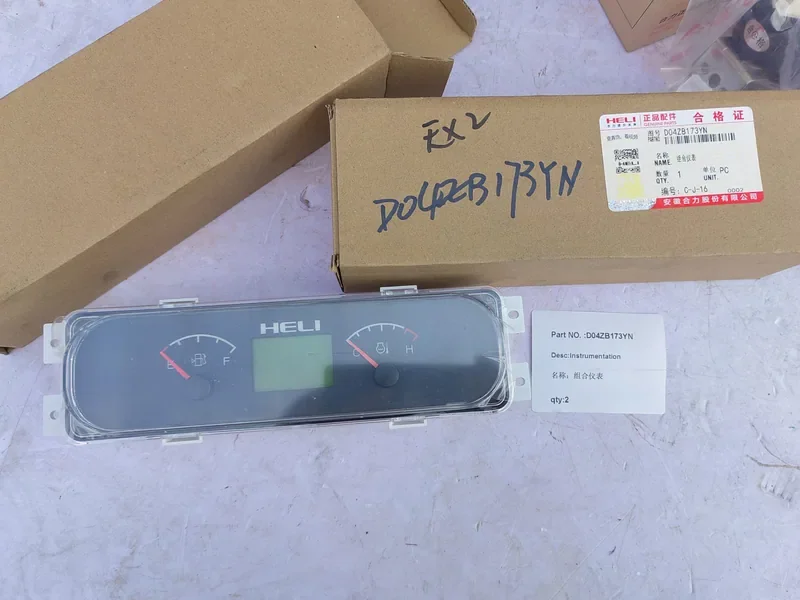
D04ZB173YN combination-meter reference. The rear connector and signal system still need checking.
The front identifies the instrument; the rear identifies the connection
D04ZB173YN is an existing combination-meter reference. The visible face includes fuel/temperature indications and an LCD. The photograph does not establish its supply voltage or a CAN interface.
Send both faces, the complete label and the connector’s populated pins. A front-panel resemblance is not a verified replacement.
Existing instrument reference; voltage and communication remain to confirm.
Common instrument systems
| Instrument family | Type / voltage / communication / functions | Truck / connector / configuration |
|---|---|---|
| Curtis 3140 / 3141 | CANopen instruments; 12 V version: 9–32 V operating range; 24–48 V version: 18–60 V operating range; AMP MATE-N-LOK connector | Truck application: to confirm. Connector: AMP MATE-N-LOK. Match order code, supply version and CAN configuration. |
| Curtis enGage VI / VII | Configurable colour display; CANopen / J1939 options. Exact supply voltage and functions: selected model/application. | Truck and connector variant: to confirm. Match screen software, messages, controls and configuration. |
| Curtis 803 | Battery indicator / hour meter / lift lockout; exact voltage variant: to confirm. CAN is not assumed. | Truck, connector and wiring: to confirm. Match battery voltage/profile and lockout configuration. |
| D04ZB173YN combination meter | Combination meter; fuel/temperature indications and LCD. Voltage and communication: to confirm. | Truck, connector and configuration: to confirm from full label, rear connections and signal sources. |
Identify what feeds each reading
| Displayed information | Signal relationship | Replacement check |
|---|---|---|
| Battery state of charge | Battery indicator settings or BMS messages | Battery chemistry/profile and the actual signal source |
| Speed / motor status | Vehicle controller, motor feedback or network data | Controller family, scaling and supported messages |
| Engine temperature / fuel | Sender characteristics or ECU messages | Sensor input curve or engine-network definition |
| Warnings and hour meter | Vehicle inputs, controller logic and stored data | Warning logic, hour-count behaviour and configuration |
| Buttons or menu functions | Vehicle-specific software and input mapping | Required controls and language/application version |
Physical fit and electrical fit are separate
Choose the instrument type and supply version from the full reference before comparing the panel opening, rear connector and signal inputs. A candidate that fits those interfaces still needs its software, scaling, warnings and required controls checked against the truck. The front-panel appearance is a starting clue, not the final order decision.
Physical fit
Record face dimensions, panel opening, mounting tabs, depth and viewing orientation. Photograph the rear label before assuming that an identical front means the same part.
Electrical fit
Record supply range, pinout, network protocol, software and input signals. A battery nominal voltage is not automatically the display’s supply voltage.
Keep uncertain references separate
If a label differs from an old quotation or listing, send both. An uncertain suffix remains unconfirmed; it is not silently converted into a cross-reference. Existing controller and BMS information can help identify the signal source.
For an inquiry, the display label, front/rear photos and truck model/serial are enough to begin. Optional existing fault messages or software details can be added later.
Ask about the part you need
A part number is optional. Send it if you have it, or choose the identification route that fits your information. No technical field below is required.
Related parts and selection information
Technical references
Manufacturer examples are not confirmed Authpart stock or vehicle fitment. Check the current documentation for the exact model and revision.
More help choosing the correct part
Forklift DC-DC Converter Selection: Input Range, Output and Isolation · Forklift Alternator Selection